BlockerX: Content Blocker
Atmana TechProductivity
4.43.72K Reviews
- Version
- 5.0.81
- Installs
- 5.00M
- Age Rating
- Teen
Screenshots
Our Review of BlockerX: Content Blocker
 Analysis by Appyee
Before installing a blocker, I’d first get clear about what I want it to change. Am I trying to reduce impulsive browsing during work, avoid a specific kind of content, or make it harder to fall into a familiar late-night loop? Those goals call for slightly different settings and routines. A blocker can add useful friction, but it works best as one part of a plan that also accounts for when and why the distraction tends to happen.
Set up a routine, not just a barrier
For me, the practical value of a blocking app is less about never encountering a temptation and more about creating a pause before acting on one. I’d pair a block with a simple alternative: close the browser, stand up, get a glass of water, or return to one clearly chosen task. That replacement matters because a blocked page does not decide what I should do next; I still need a routine for that moment.
It also helps to choose boundaries that match real life. If I need a browser for research or work, blocking too broadly can turn a helpful safeguard into a daily obstacle. I’d begin with the content I’m specifically trying to avoid, then adjust only after seeing where the boundary is too loose or too restrictive. A small, deliberate setup is easier to live with than a sweeping one I’m tempted to undo.
Make the hard moments easier to handle
A useful test is to think through a realistic day rather than judge the app from its setup screen. Imagine finishing a long work session, feeling tired, and reaching for the phone out of habit. If the blocker interrupts access, the next question is whether I already know what I want to do instead. A short walk, a message to someone I trust, or putting the phone down while I make tea can turn that interruption into a repeatable choice instead of a frustrating dead end.
I’d also review how the settings fit around ordinary responsibilities. Someone using a device for shared family browsing, school research, or work may need different boundaries from someone who mainly wants help during unstructured evening hours. If the app gets in the way of legitimate browsing, I’d refine the setup rather than assume that stronger restrictions are automatically better.
How it fits beside other focus tools
Built-in screen-time controls can be a reasonable first stop if I mainly want general limits on app use. Browser filters may suit someone who only needs help in a particular browser. A dedicated blocker such as this one makes more sense when the goal is specifically to reduce access to adult material and create added accountability around that effort. These options are not interchangeable: a general timer can curb scrolling without addressing the content itself, while a narrow filter may not help with distractions elsewhere.
I would not treat any blocker as a complete productivity system or a substitute for personal support. It can make a chosen boundary easier to keep, but it cannot resolve the reasons a habit formed or make every workaround impossible. If the main problem is endless time in social apps, a general focus tool may be a better match; if the difficulty feels distressing or out of control, a phone setting alone may not be enough.
Who is likely to get the most from it
I can see this being useful for someone who has identified a specific browsing pattern and wants a practical barrier, especially if they benefit from a sense of accountability rather than relying on willpower alone. It may be less suitable for a person who needs unrestricted access for their job, shares a device with others, or expects the app to make a difficult habit disappear without any change in routine. Before depending on it, I’d consider who controls the device, how the boundaries affect other users, and whether the chosen setup is realistic to maintain.
There are also a few questions worth answering before making it part of a daily routine. Will it cover the browsers and apps I actually use? Do I want accountability, or would that feel intrusive? What should I do if a legitimate page is blocked? I’d check the current settings on my own device, decide in advance how I’ll handle an accidental block, and make sure any accountability arrangement is something I freely choose. Those steps reduce the chance of a useful tool becoming a source of avoidable stress.
Hey there! So, I recently got my hands on BlockerX: Porn Blocker, and let me tell you, it’s quite the app if you’re looking to keep distractions at bay. If you’re curious about how it works, stick around because I’m diving deep into its features, usability, and overall vibe.
Getting Started with BlockerX
First things first, downloading and setting up BlockerX is a breeze. Just head over to the Google Play Store or Apple App Store, and you’re good to go. Registration is straightforward; you can sign up using your email, and you’re immediately introduced to its clean and intuitive interface.
At its core, this is a productivity app from Atmana Tech for people who want help managing access to adult material and staying focused. It is free to install, with in-app purchases ranging from about fifty cents to around three hundred and fifty dollars per item, so I’d check what a particular purchase covers rather than assume that every useful option is included at no cost. Its average rating is 4.4 from around 273,000 ratings, and it has over five million installs. That level of uptake makes it a familiar option in its niche, though popularity alone can’t tell me whether its approach suits my habits.
The app is rated Teen, runs on Android 6.0 and later, and its current version is 5.0.41. It first appeared on June 10, 2019, so it isn’t a brand-new experiment. I’d still check that my device and needs line up with the current app before building a routine around it, especially if I’m switching phones or relying on a particular browser.
Features You’ll Love
Once you’re in, you’ll notice that BlockerX isn’t just about blocking adult content. It’s packed with features that promote digital well-being. Let’s break it down:
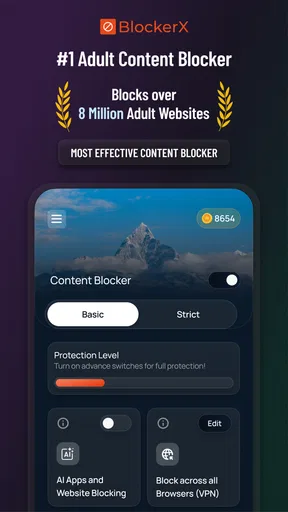
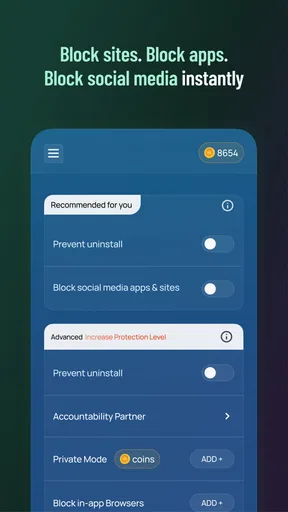
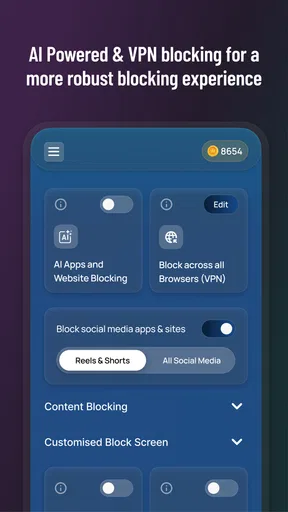
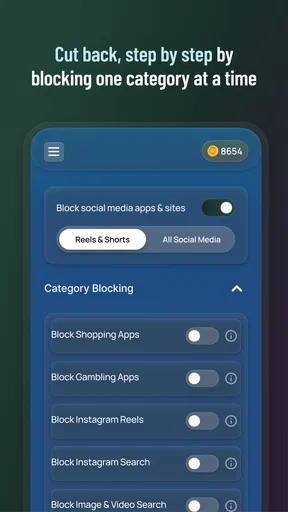
- Comprehensive Blocking: This app doesn’t just block porn; it allows you to block various categories of content, which is super handy if you’re aiming for a distraction-free environment.
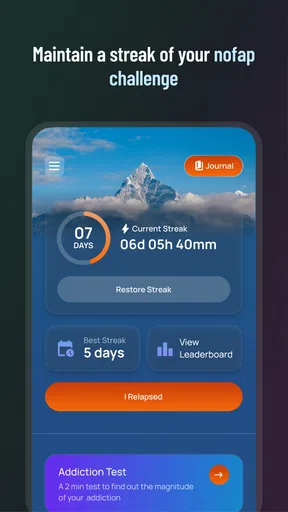
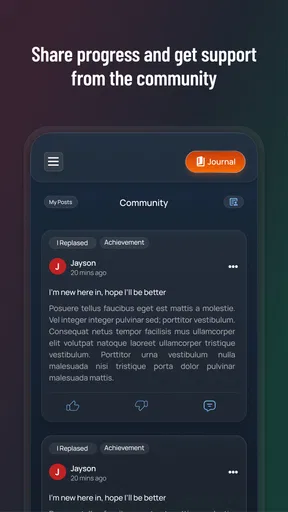
- Community Support: One thing I found absolutely neat is the community feature. You can connect with others who are using the app, share experiences, and even get some motivation.
- Accountability System: If you’re serious about staying on track, you can add an accountability partner. They’ll get alerts if you try to disable the app, keeping you honest.
Those options are most useful when I give each one a clear job. I’d use content blocking to set the boundary, community support for encouragement, and an accountability partner only if sharing that information feels comfortable and genuinely helpful. More oversight is not automatically better: a partner should be someone I trust, and I should agree on what accountability means before relying on it.
A less obvious but practical tip is to make a short list of the sites or situations that repeatedly derail a particular task, then use that pattern to shape the boundary. The goal isn’t to block everything on the internet; it’s to remove the familiar shortcuts that turn a quick check into lost time. If I use the phone for research, I’d test the setup with ordinary work searches as well as the situations I’m trying to avoid.
The User Experience
One thing I appreciate about BlockerX is its simplicity. The design is minimalistic, which makes navigation a piece of cake. Even if you’re not tech-savvy, you’ll find it easy to tweak settings to suit your needs.
The app runs smoothly without any noticeable lag, and the blocking feature is effective. You can customize what you want to block, and it works seamlessly in the background without draining your battery life.
For a repeatable routine, I’d review the settings at a calm time rather than wait until I’m frustrated by a block or tempted to switch it off. That gives me a chance to decide which categories should stay restricted and whether the boundary still fits my schedule. If a site needed for a legitimate task is affected, I’d treat that as a signal to refine the setup, not as proof that all blocking is pointless.
Compatibility and Performance
BlockerX is available for both Android and iOS devices. I tested it on both platforms, and the experience was consistent. The app is lightweight, so it doesn’t hog space on your device, which is always a win in my book.
It integrates well with other apps and browsers, ensuring that the blocking feature is comprehensive. Whether you’re using Chrome, Firefox, or Safari, BlockerX has got your back.
Even so, I wouldn’t assume that every app, browser, or device behaves exactly the same. Before depending on a block during a workday, I’d test the sites and apps I use most, including any browser I might switch to when one route is inconvenient. That small check is particularly useful for people who move between a phone and a shared computer, since a phone-based tool may not govern browsing elsewhere.
One trade-off is that stronger boundaries can create more friction when a legitimate page is caught in them. That may be worthwhile when the priority is making an impulse harder to follow, but it can be annoying when a blocked page is essential to a task. I’d keep the setup focused, learn how to adjust it responsibly, and avoid treating the strictest possible configuration as the only successful one.
A Few Things to Keep in Mind
While the app is robust, there are a few things to consider. The free version offers basic functionality, but if you want to unlock all features, you might want to consider the premium subscription. It’s not too pricey, and given the added benefits, it’s worth the investment if you ask me.
Another point is that the app requires accessibility permissions to function effectively. It’s a standard requirement for blocking apps, but it’s something to be aware of if privacy is a concern for you.
I’d be cautious about making any purchase until I know which feature I actually need. The purchase range is wide, so I’d compare the specific option with my goal and confirm that it addresses a real gap in my routine. If the basic setup already gives me enough structure, paying more may not improve the outcome; consistency and a realistic response to urges matter more than adding every available tool.
Permissions deserve the same deliberate approach. I’d read the prompts on my own device and decide whether I’m comfortable granting the access needed for the functions I choose. Anyone who is uneasy about permissions or sharing accountability details should pause and weigh that against the benefit they expect, rather than accepting every request automatically.
Another limitation is that a blocker can be bypassed in spirit even when its settings are working: I can pick up another device, change activities, or simply spend time wrestling with the restriction. That is why I’d use it to support a plan, not as proof that the habit is solved. If I repeatedly find myself trying to defeat the boundary, I’d reconsider the plan and seek human support where appropriate instead of just tightening settings indefinitely.
Final Thoughts
Overall, BlockerX delivers on its promise to help users maintain focus and avoid distractions. Whether you’re looking to block adult content or just want a cleaner browsing experience, it’s a solid choice. The added community and accountability features are a nice touch, making it more than just a blocking app.
If you’re on the fence, I’d say give the free version a whirl, and if it aligns with your needs, the premium features are a worthy upgrade. Here’s to a more focused and distraction-free digital life!
My recommendation is to adopt it when the problem is specific enough that a clear block could help, and to pair that block with one small action I can repeat when an urge or distraction appears. It’s less compelling if I only want broad limits on general screen time, need unrestricted browsing across devices, or expect a single app to do the work of changing a habit. Used thoughtfully, it can be a useful part of a sustainable productivity system: a boundary, a routine, and an honest check on whether both still serve me.
Verdict
Strengths of BlockerX: Content Blocker
- Effective at filtering explicit content.
- Simple interface for easy navigation.
- Customizable blocking options.
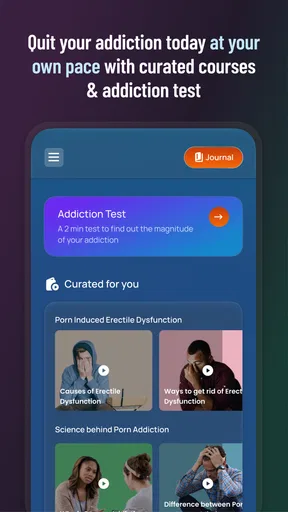
- Provides daily motivation reminders.
- Strong community support system.
Limitations of BlockerX: Content Blocker
- Requires subscription for full features.
- Limited free trial period.
- May slow down device performance.
- Occasional false positives in blocking.
- Not effective offline.
Similar Picks in This Category
View All
Google Calendar
Google LLC4.6

Google Drive
Google LLC4.3

Google Assistant
Google LLC3.9

Microsoft OneDrive
Microsoft Corporation4.6

Samsung Calendar
Samsung Electronics Co., Ltd.4.1

Microsoft OneNote: Save Notes
Microsoft Corporation4.6
Frequently Asked Questions
What is BlockerX and how does it work?
BlockerX is a comprehensive app designed to help users block adult content on their devices. It uses advanced filtering technology to prevent access to pornographic sites and apps. Users can customize their settings, choose specific websites to block, and even set up accountability partners to ensure they stay on track.
Is BlockerX available for both Android and iOS?
Yes, BlockerX is available on both Android and iOS platforms. Users can download the app from the Google Play Store or Apple App Store. It offers a seamless experience across devices, ensuring that your preferences and settings are synchronized.
Does BlockerX offer a free version, or is it subscription-based?
BlockerX offers both a free version and a premium subscription. The free version includes basic features such as content blocking and accountability tools, while the premium version provides advanced options like unlimited blocking, priority support, and enhanced customization.
Can BlockerX be bypassed or disabled easily?
BlockerX is designed to be robust and difficult to bypass. It includes features such as password protection and accountability partnerships that require mutual consent to change settings. However, users should be committed to using the app responsibly for it to be truly effective.
How can I ensure my privacy is protected with BlockerX?
BlockerX takes privacy seriously and does not store any personal browsing data. The app requires minimal permissions and encrypts any information used for blocking purposes. Users can confidently use BlockerX knowing that their privacy is safeguarded.
